


Use to summarize this article


- What it is: A Webflow Localize feature where AI agents translate your site, either once for review or continuously as your content changes.
- What changed: Translation no longer waits for someone to trigger it. Choose one-time translation for a reviewed first pass, or continuous translation to keep every locale in sync.
- What controls it: Gemini-powered AI translation, tone and formality settings, a glossary, exclusion rules, and translation memory.
- Availability: Launched September 29, 2026, and included on all Webflow Localize plans. Translated words count toward your plan's pooled word limits.
- How to roll it out: Use Prep, Sync, Sign-off. Set rules first, keep pricing, legal, and compliance content out of continuous translation, and review those pages by hand.
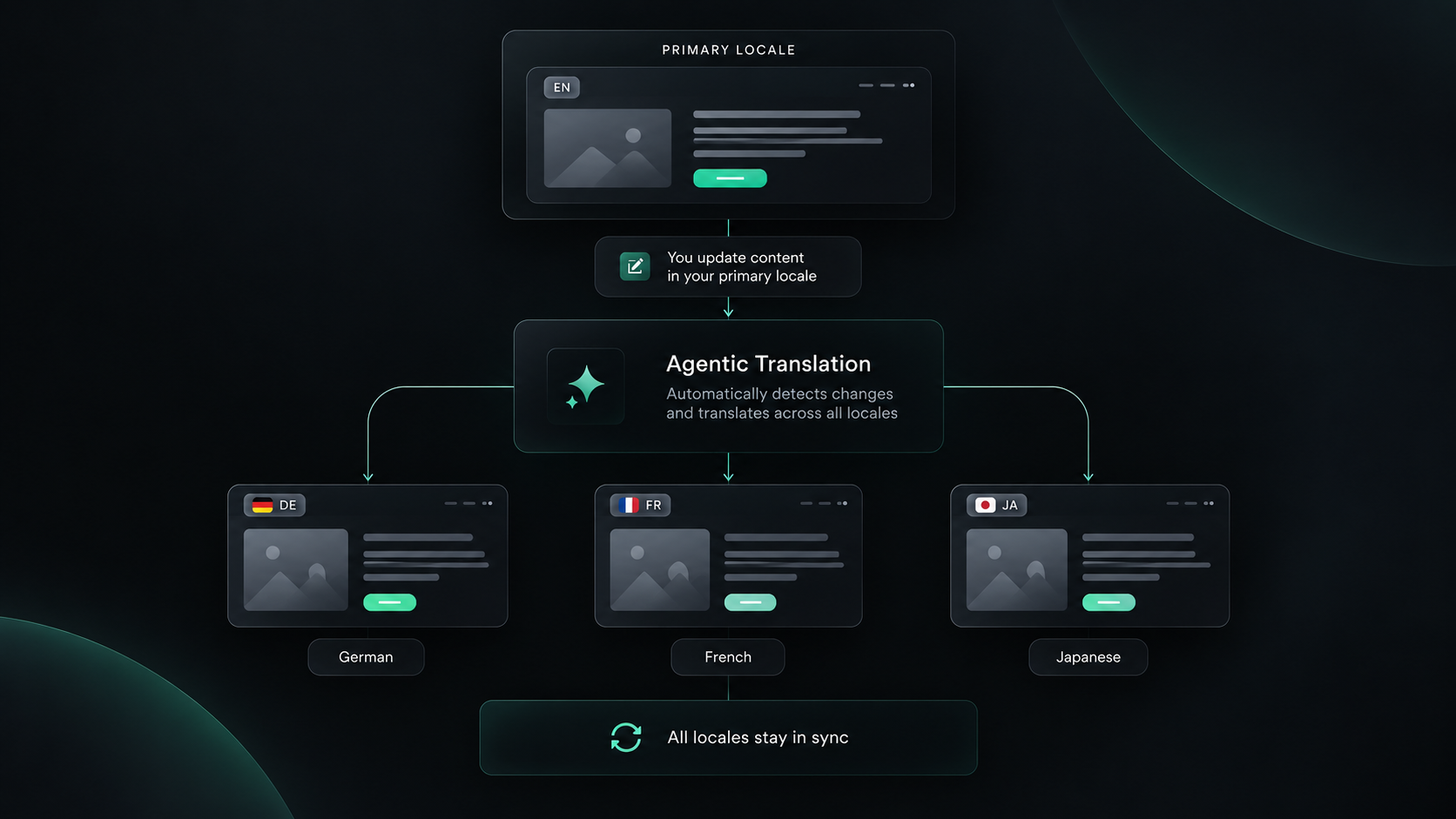
Webflow Agentic Translation is a Webflow Localize feature that automatically translates copy updates into every locale on your site, in real time.
You edit your primary language once. Your other locales follow.
Webflow announced it at Webflow Conf on September 2, 2026, and launched it on September 29. It's rolling out now.
Here's the problem it solves.
You launch a German version of your site. It takes weeks.
Two months later, marketing rewrites the homepage headline. The English site gets the new pitch. The German site keeps the old one.
Nobody notices until a prospect in Munich does.
That's the real cost of a multilingual website. Not the first translation. Every translation after it.
Agentic Translation goes after exactly that. It doesn't make translation perfect. It makes it continuous.
At Flowtrix, we build Webflow Enterprise websites for companies selling across regions, from ZingHR in India, the Middle East, Africa, and APAC to Amazon Signage across global markets.
This guide covers how it works, what it costs, and how to prepare your site before you switch it on.
Webflow Agentic Translation at a glance
- What it is: An automatic translation feature inside Webflow Localize.
- What it does: Uses AI agents to translate your site, either once for review or continuously as your primary locale changes.
- Modes: One-time translation and continuous translation, set per target language.
- Announced: September 2, 2026, at Webflow Conf.
- Status: Launched September 29, 2026, and rolling out now.
- Translation engine: Webflow's AI translation runs on Gemini.
- Controls: Glossary, tone and formality settings, exclusion rules, and translation memory.
- Pricing and plans: Included on all Webflow Localize plans. Translated words count toward your plan's word limits.
What is Webflow Agentic Translation?
Webflow Agentic Translation is an always-on translation layer for sites that use Webflow Localize.
Once enabled, copy updates show up in the correct language across your locales, in real time. That's how Webflow describes it.
Webflow says it turns thousands of manual clicks into a one-time setup.
Want more control? You can treat the output as a first draft and edit it. That's exactly what one-time translation is for. More on the two modes below.
What "agentic" means here:
Most AI translation is on-demand. You click a button, it translates, it stops.
An agentic tool keeps working in the background. It spots changes and acts on them without being asked.
So translation stops being a task you schedule. It just runs.
Key terms you'll see:
- Locale: A language and region version of your site, like German for Germany.
- Primary locale: Your main language. Every edit starts here.
- Secondary locale: Every other language version of your site.
- Webflow Localize: Webflow's built-in localization product. You'll also see it called Webflow Localization.
How is Agentic Translation different from Webflow's current AI translation?
The difference is who starts the translation. Today, a person does. With Agentic Translation, the system does.
Right now, a new secondary locale starts as an exact copy of your primary locale. Nothing translates until you trigger it.
The catch comes later. When your English copy changes, someone has to re-trigger translation for every locale.
Webflow says this openly. Translation has stayed manual, even with AI on demand.
It also says standing up a new locale can take months.
Agentic Translation removes the trigger. Updates flow to every locale on their own.
| Dimension | Manual translation | On-demand AI translation | Agentic Translation |
|---|---|---|---|
| Who starts it | A person, page by page | A person clicks translate | AI agents, once enabled |
| When primary copy changes | Someone rewrites every locale | Someone re-triggers every locale | Continuous mode updates each locale automatically |
| Time to launch a locale | Weeks to months | Faster, still hands-on | Much faster, per Webflow |
| Review control | Full | Full | Full review with one-time mode, editable anytime with continuous |
| Best for | High-stakes copy | Occasional updates | Sites that change often |
How does Webflow Agentic Translation work?
You choose a translation mode for each target language, and AI agents do the rest. Here's how each mode works, based on Webflow's launch post.
One-time translation:
Agents translate an entire target language once, including page content and metadata.
Your team reviews, edits, and sharpens it before it goes live.
After that, the locale stays as your team left it, even if your primary content changes.
Continuous translation:
Agents keep every locale in sync with your primary locale.
Edit a headline in English, and every locale with continuous translation turned on updates automatically.
It uses your tone, formality, and glossary settings to keep translations on-brand.
The layers it's built on:
- Structure sync. Primary and secondary locales stay aligned.
- Gemini-powered translation. Webflow switched to Gemini in May 2026. It translates full sentences, not word by word.
- Formatting that survives. Bold text and links get reattached to the right words.
- Component and code controls. You decide how component properties and custom code translate.
- Tone and formality. Set per language, so translations don't go flat.
What it covers:
One-time translation covers page content and metadata, per Webflow.
Exclusion rules reach pages, components, CMS fields, and component props, so you control exactly what agents touch.
For setup details, see Webflow's Help Center guide.
One-time vs continuous translation: which should you use?
Use one-time translation where accuracy matters most. Use continuous translation where speed matters most.
The mode is set per target language, not per page. So you choose it market by market.
Use one-time translation when:
- You're launching a new market and want a reviewed first version.
- The locale carries high-stakes pages, like pricing, legal, and compliance.
- You have someone who can review every change before it goes live.
Use continuous translation when:
- Your site changes often, with regular blog posts, feature pages, and updates.
- Keeping every locale current matters more than perfect wording.
- Your glossary, tone, and exclusion rules are already set.
Running continuous translation on a locale with high-stakes pages?
Use exclusion rules to keep pricing, legal, and compliance content out of automatic translation. Then translate and review those parts by hand.
How does Webflow keep AI translations consistent?
Webflow gives you four controls: tone and formality, a glossary, exclusion rules, and translation memory. Speed means nothing if every locale sounds like a different company.
Tone and formality:
English doesn't mark formality. German does (du vs Sie). So does French (tu vs vous).
Translating from English, the AI has no signal. So it guesses.
In July 2026, Webflow added tone and formality settings per language.
You can fix a language to formal. Or hold it to one tone so it doesn't drift.
It needs the Advanced Localize add-on or an Enterprise plan.
And it isn't retroactive. Only new translations change.

Glossary:
Webflow's translation glossary locks terms that should never change. Think company names, product names, and feature names.
It lives in the Localization panel, next to Locales, URL Routing, and SEO.
Translation memory:
Translation memory stops Webflow from re-translating content that hasn't changed.
If the source text, language, and settings stay the same, the existing translation gets reused instead of running through AI again. That's per Webflow's Help Center.
Exclusion rules:
These tell Webflow what not to translate. More below.
What are Webflow translation exclusion rules?
Exclusion rules stop specific content from being translated by AI.
You can exclude specific pages, components, CMS fields, and component props. Excluded content is never passed to an AI model, according to Webflow.
Rules can be scoped separately to manual and automatic translation. That's per Webflow's developer changelog.
That matters here. You can use AI on a page manually but block it from auto-updating.
What to exclude on a B2B site:
- Brand and product names, if your glossary misses them.
- Code snippets, which should never be translated.
- SKUs, reference codes, and internal-only fields, which Webflow itself calls out.
- Customer quotes, since translating them changes what the person said.
- Legal text, which needs a qualified translator.
The Prep, Sync, Sign-off model
Prep, Sync, Sign-off is a three-step model for rolling out automated translation safely. Set the rules, automate what changes most, and keep a human on pages that carry risk.
Prep, set the rules before you switch it on:
- Lock your structure. Mid-redesign? Wait. Every edit triggers a translation.
- Build your glossary. Brand, product, and industry terms.
- Set tone per language. It won't apply retroactively.
- Add exclusions. Quotes, code, and legal text.
Sync, automate what changes most:
- Blog posts and resources
- Feature and product pages
- Help center and FAQs
- Changelogs and release notes
Sign-off, review what carries risk:
A slightly wrong translation here can cost you a deal.
- Pricing pages
- Legal, terms, and privacy pages
- Security and compliance pages (SOC 2, GDPR, ISO)
- Homepage hero and core positioning
Agentic Translation Readiness Checklist
- Site structure locked, with no redesign in progress
- Glossary covers brand, product, and feature names
- Tone and formality set for every target language
- Exclusion rules added for quotes, code, and legal text
- Low-risk pages chosen for automatic sync
- Human review kept on pricing, legal, and compliance pages

What does this look like on real B2B websites?
Automated translation only works on a site that's built for it. Here's what we've learned from four Webflow projects that serve buyers in more than one market or audience.
Amazon Signage, one design system across markets:
We built Amazon Signage's Webflow site to explain the Signage Stick to six industries, from K-12 to healthcare and retail.
Localized content and language support across global markets was part of the technical spec from day one.
The site adapts language and content to each visitor's region. The core design stays the same.
We shipped 20+ pages in 5 weeks, with a CMS that makes content updates 10x faster.
The lesson: Automation is safe when the design system is locked. Translate the words, not the layout.
ZingHR, regions built into the CMS:
ZingHR is an enterprise HRMS used by 1000+ companies across India, the Middle East, Africa, and APAC.
The site had to speak to enterprises in India, MEA, and SEA without feeling like a generic global template. So we designed region and industry-specific layouts.
We migrated 22+ pages in 4 weeks, with URL mapping, redirects, schema, and metadata planned to protect rankings.
Now ZingHR's marketing team ships new pages without filing developer tickets.
The lesson: Structure your regions in the CMS first. Then automation has something clean to work with.
Akirolabs, why formality matters:
akirolabs is a Berlin-based AI platform for procurement teams.
We built them a scalable, CMS-driven Webflow site that lifted conversion rates 2.5x.
If a company like akirolabs adds a German locale, formality is the first setting to lock. Enterprise buyers in Germany usually expect the formal "Sie."
The lesson: Set tone and formality in the Prep step. It won't fix pages that are already translated.
Wayground, why timing matters:
Wayground, formerly Quizizz, serves schools and districts worldwide.
When they rebranded, every page changed at once. We built a scalable CMS for the new identity, and the site saw 2.5x higher engagement and 30% more traffic.
A rebrand is exactly when you should not have automated translation running. Every draft change would trigger a new translation job.
The lesson: Finish the rebrand. Lock the copy. Then switch on Agentic Translation.
Is Webflow Agentic Translation good for multilingual SEO?
Yes, mostly because it fixes stale pages. Your SEO settings still live in Webflow Localize.
Your English page gets updated. Your German page doesn't. Now they drift apart.
Visitors see old information. Your localized pages fall behind.
Agentic Translation keeps every locale in step with your primary language.
What about AI content and Google?
Google judges quality, not how content was made.
AI-translated pages aren't penalized for being AI. They're judged on accuracy and usefulness. More in Is AI Content Bad for SEO?
What about AI search?
AI engines like ChatGPT, Perplexity, and Google AI Overviews tend to cite content in the same language as the question.
A study by Weglot, a translation company, analyzed 1.3 million AI citations and found a strong preference for same-language sources.
So an English-only site is nearly invisible to a buyer asking ChatGPT a question in German.
Agentic Translation helps here in one specific way. It keeps every locale current, so AI engines find up-to-date answers in each language.
How to make your locales easy for AI engines to cite:
- Answer first. Start each section with a direct answer, in every language.
- Keep entity names consistent. Your brand and product names should never be translated. Use the glossary.
- Localize your metadata. Meta titles and descriptions for your top pages in each language.
- Localize your slugs. Enterprise and Advanced Localize plans can translate Collection slugs.
- Track each locale separately. Check Search Console by language, not just the site total.
Need help? Our SEO and AEO team handles multilingual Webflow SEO, including how your site shows up in AI search.
Does Agentic Translation close the gap with Weglot?
Partly. Agentic Translation answers Weglot's biggest criticism of Webflow, which was the lack of automatic translation.
Weglot's own comparison guide says Webflow needs manual triggers for each CMS item.
Agentic Translation is Webflow's answer. Now that it's live, that argument gets much weaker.
What's still different:
- Weglot runs as a separate layer, outside the Webflow Designer.
- Tools like Lokalise add translator roles, review workflows, and deeper translation management.
- Webflow Localize keeps design, content, SEO, and translation in one place.
Translating a few pages into one language? Native Webflow is likely enough.
Running a dozen languages with a localization team? Add a translation management tool on top.
How much does Agentic Translation cost, and which plans get it?
Agentic Translation is included on all Webflow Localize plans, per Webflow.
There's no separate fee. But translated words count toward your plan's word limits, which are pooled across your locales.
Webflow also added an in-product usage tracker. If you run out, you can buy more translation capacity with AI credits.
How to stretch your word limits:
- Exclude what doesn't need translating. Excluded content never reaches the model.
- Let translation memory work. Unchanged content reuses existing translations.
- Use continuous translation only where you need it. Every change in a continuous locale gets translated.
Some related features still depend on your plan:
- Gemini AI translation: all Localization plans.
- Tone and formality: Advanced Localize add-on or Enterprise.
- Collection slug translation: Enterprise and Advanced Localize.
For current plans, see our Webflow pricing guide for 2026.
When is Webflow Agentic Translation available?
Now. Webflow launched Agentic Translation on September 29, 2026, and it's rolling out to all Webflow Localize plans.
Don't see it yet? Check the Webflow updates feed and Webflow's setup guide.
Glossaries, tone settings, and exclusions work today.
Do the Prep step before you switch it on.
Final thoughts
Multilingual sites rarely fail at launch. They fail six months later.
The English site moves on. The other locales don't.
Agentic Translation fixes that drift. It won't decide your brand voice in German, or which pages are too important to automate.
That part is still yours.
Set the rules. Review what matters. Let automation handle the rest.
Planning a multilingual Webflow site? Talk to Flowtrix. We've built Webflow sites for teams like ZingHR, Amazon Signage, akirolabs, and Wayground.
Flowtrix has delivered 120+ website projects for B2B SaaS, AI, and cybersecurity teams. Here's the work behind the examples in this post.

.svg)

A scalable, CMS-driven site for a Berlin-based AI procurement platform, with 2.5x higher conversion.

A rebrand-ready CMS for schools and districts worldwide, with 2.5x higher engagement.
FAQ's
The most common questions teams ask about Webflow Agentic Translation, from availability and plans to SEO and human review.



.webp)






.svg)
.svg)

