

Use to summarize this article


- Lokalise is the strongest overall platform: deep AI tooling and workflow automation for teams shipping content continuously, but plans start high and scale fast with seats and volume.
- Webflow Localization is now the default for Webflow sites: native SEO control, per-locale design, and pricing that doesn't scale with word count the way proxy tools do.
- Weglot still wins on speed: live in under 30 minutes with no CMS integration required, but the proxy model means cost scales with word count and language count.
- Crowdin remains the best free and open-source option: the most generous OSS program in the category, built around community and crowdsourced translation.
- No single tool wins for every team: the right pick depends on whether you're translating a five-page marketing site once, or shipping product copy every sprint.
Your board wants a number for international revenue next quarter, and somebody just realized the website only exists in English. Now you are the person googling "best localization tool" at 11pm, staring at fourteen browser tabs that all claim to be the number one pick.
Every vendor's homepage says the same thing: automatic, seamless, AI powered, live in minutes. None of them tell you what breaks six months in, when your content team is manually re-triggering translations after every CMS update, or when your SEO lead notices the French pages are getting flagged as duplicate content because nobody set up hreflang correctly.
We build and revamp B2B SaaS, AI, and cybersecurity websites for a living, mostly on Webflow, and localization comes up in nearly every project that touches an international market. We have watched teams pick a tool because the demo was fast, then rebuild the whole pipeline a year later once the word count bill or the SEO mess catches up with them.
This is the honest version. What each major tool is actually good at, where it breaks, and how to pick without wasting six months. At Flowtrix we revamp B2B SaaS, AI, and cybersecurity websites as a Webflow Enterprise Partner, so localization is something we build around, not something we read about on a spec sheet.
Why does "best" depend on what you're building?
Ask five agencies which localization tool is best and you'll get five different answers, because they're usually all correct for the client in front of them. A content site translating a blog into three languages has almost nothing in common with a SaaS product syncing UI strings across a CI/CD pipeline every week.
The tooling landscape has also gotten more crowded and more capable at the same time. AI translation quality has improved enough that raw machine output is often publishable with light editing, not the stilted mess it was a few years ago. Translation management platforms have added workflow automation on top of that. And CMS platforms, Webflow included, have started building localization directly into the product instead of leaving it entirely to third parties.
That's good news and bad news. Good, because you have real options at every budget. Bad, because the stack decision you make now, which platform, which machine translation engine, which CMS integration, compounds into either a system your team barely notices or a maintenance problem someone inherits in eighteen months.
What actually varies between tools:
- Where the translated content lives: in your CMS, in a third-party proxy layer, or in a separate translation management system connected by API.
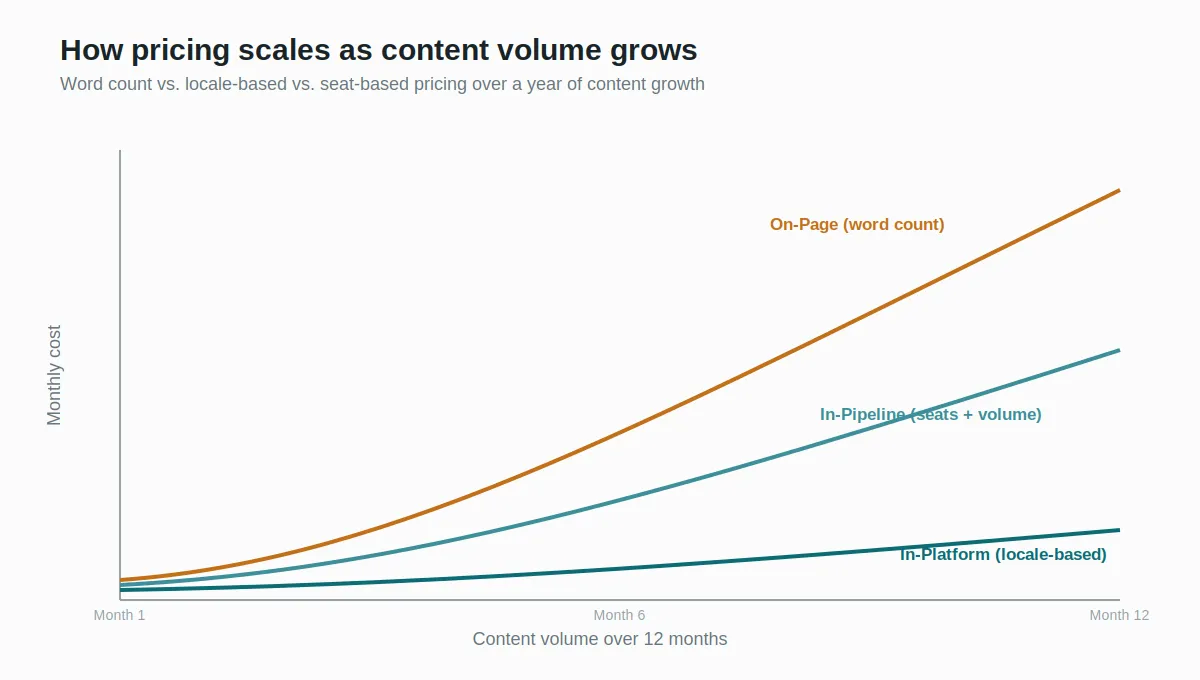
- How pricing scales: per word, per seat, per locale, or a flat rate regardless of volume.
- Who does the translating: machine translation only, human review layered on top, or a managed network of professional translators.
- How much SEO control you get: automatic hreflang and subdirectory URLs versus full manual control over metadata per locale.
The Where the Words Live framework
After building and revamping 120+ B2B websites, we kept running into the same decision point with clients, and it wasn't which tool has the longest feature list. It was where the translated words physically live once the project ships. That question predicts almost everything else: setup time, ongoing cost, who owns the content, and how much SEO control you actually get.
We group every localization tool into three layers.
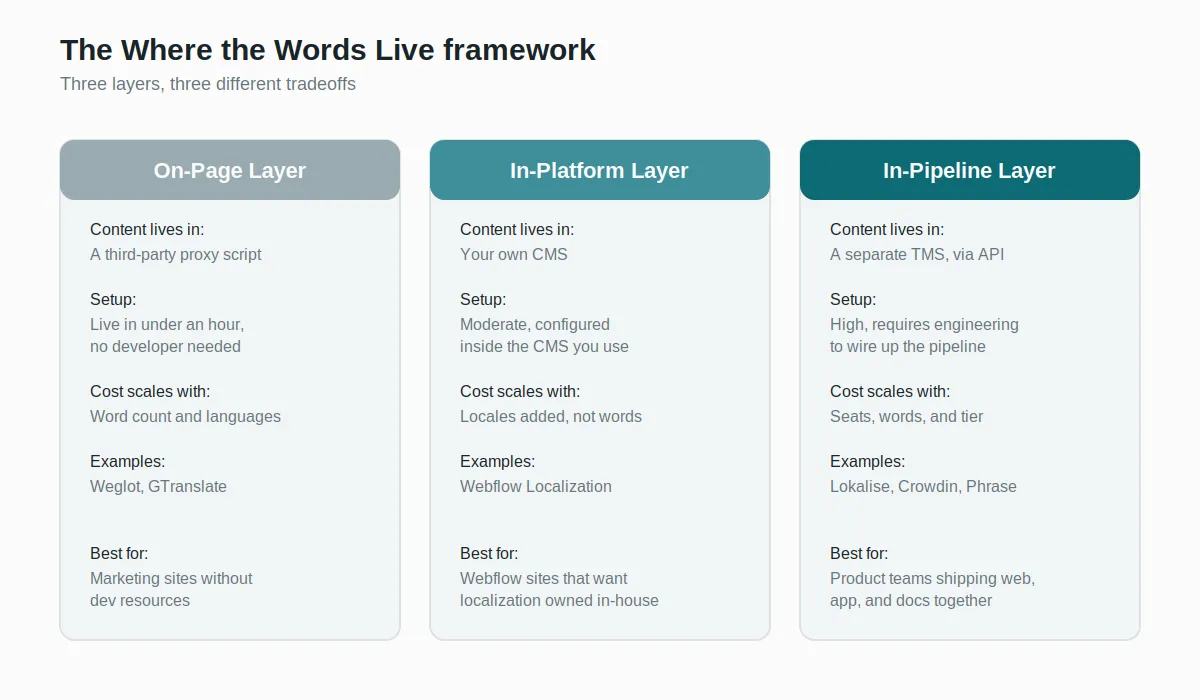
The On-Page layer:
Tools like Weglot and GTranslate detect your site's content and serve translated versions through a script or proxy, without touching your CMS or codebase. Nothing to build. A language switcher appears, machine translation runs automatically, and a human can go in and edit specific strings afterward through a visual editor. The tradeoff is that your translated content technically lives with a third party, not in your own system, and heavy proxy layers can add a small performance cost on pages that are already optimized down to the millisecond.
The In-Platform layer:
This is localization built natively into the CMS you already publish from. Webflow's own Localization feature is the clearest example: locales, routing, per-locale design overrides, and SEO settings all live inside Webflow itself. Nothing to sync, nothing hosted elsewhere. The Essential tier covers CMS and static page localization with 10,000 words of machine translation per locale per month, and the Advanced tier raises that to 50,000 words and adds URL translation and automatic visitor routing. The tradeoff is that you're limited to what that specific platform supports, and switching CMS platforms later means rebuilding your localization setup from scratch too.
The In-Pipeline layer:
Translation management systems like Lokalise, Crowdin, and Phrase plug into your codebase and CI/CD pipeline. Product and engineering teams use these because website copy is often just one content type among many, alongside mobile app strings, in-product UI, and help docs, and it all needs to update in the same workflow every time a developer ships a pull request. The tradeoff is complexity: these tools assume a technical team is managing the pipeline, not a marketer clicking a translate button.
When does it actually make sense to bring in a dedicated tool?
Not every site needs a translation management system, and reaching for one too early is an expensive way to learn that.
You have real content volume across more than one surface:
If you're translating a website, a help center, and in-product UI, and all three need to stay in sync as your product ships weekly, an In-Pipeline tool like Lokalise or Crowdin earns its complexity. Translation memory alone, remembering how a term was translated last time instead of re-translating it from scratch, saves real money once your word count climbs into the tens of thousands.
You're expanding into two or three markets, not twelve:
For a growing B2B SaaS site adding French, German, and Japanese, an In-Platform option like Webflow Localization or a fast On-Page tool like Weglot covers the need without the overhead of a full TMS. Save the heavier platforms for when you're managing content across many markets and many content types at once.
Your SEO strategy depends on the translated pages ranking:
This is where the layer you pick matters most. hreflang mistakes, duplicate content flags, and untranslated metadata are the most common reasons international pages underperform even after the translation work is technically done. An In-Platform option gives you the most direct control over this because the SEO fields live in the same system as the content.
The honest ranking
This is ranked the way Flowtrix actually recommends tools to clients: by what we'd implement on a live project, not by feature count. A tool with fewer features that fits your team correctly beats a tool with more features that nobody on your team can maintain, and that's the standard every entry below is held to.
1. Lokalise: The deepest platform, if you can justify the price:
Lokalise is built for teams that ship content continuously and treat localization as an engineering workflow, not a one-time project. Translation memory, glossaries, AI-assisted quality scoring, and native mobile SDKs make it the strongest platform in the category for product-led companies translating web, app, and in-product copy from one system. Reviewers consistently point to the screenshot-in-context feature and mobile OTA update support as standouts that Crowdin and Phrase don't match as cleanly.
What works: the deepest AI stack in the category, genuinely useful translation memory, and a UI that both engineers and translators can navigate without hand-holding.
Where it falls short: the price. Public pricing starts around $140/month, and Lokalise dropped its free tier a few years back, which stung smaller teams. Once you factor in seats and word volume, growing companies commonly land in the several-hundred-dollar-a-month range before machine translation usage is even added. Compare that directly against Phrase and Crowdin before you sign anything.
2. Webflow Localization: The native pick for Webflow sites:
Webflow shipped its own Localization feature as a paid add-on to the Site plan, and it has matured into the practical default for Webflow-built sites. CMS and static page content, localized SEO fields, per-locale style overrides, and automatic visitor routing are all handled natively, with the Advanced tier unlocking URL translation, asset localization, and machine translation up to 50,000 words per locale per month.
What works: your translated content lives inside Webflow itself, not with a third party, so international SEO stays fully in your own hands and your cost doesn't creep upward as your word count grows. Structurally, this is the strongest argument for choosing it over a proxy tool.
Where it falls short: it only covers Webflow. If you ever migrate CMS platforms, your localization setup migrates with the rebuild, not independently of it. Real-time collaborative editing on translations also requires the Enterprise plan, which is a gap smaller teams should know about going in.

3. Weglot: Fastest way to a multilingual site:
Weglot detects your existing content and translates it automatically through a proxy layer, with a visual editor for human review afterward. No CMS integration, no developer setup, live in under 30 minutes on almost any platform. For years it was the default answer for Webflow sites specifically, before Webflow built its own native option, and it remains one of the most established players in the category, translating websites since 2016.
What works: genuinely the fastest path to a live multilingual site, works on nearly any CMS, and the excluded-pages feature means you're not stuck translating content that doesn't need it.
Where it falls short: pricing scales with word count and number of languages, starting around $190/year for one language at 10,000 words, and that bill grows faster than most teams expect once a blog, docs, and product pages are all in the mix. The proxy architecture can also add a small performance cost on pages already optimized for Core Web Vitals, worth checking if speed is a competitive factor for you.
4. Crowdin: The open-source standard:
Crowdin built its reputation on community and crowdsourced translation, and its open-source program is the most generous in the category, free for qualifying projects. For teams with an engaged user base willing to help translate, or open-source projects that need multilingual docs and interfaces, nothing else in this list matches it on cost or community tooling. Pro plans start around $50/month, well below Lokalise's entry tier for a comparable feature set.
What works: unmatched community translation and crowdsourcing tools, transparent self-serve pricing that hasn't changed much since 2024, and a genuinely strong open-source program.
Where it falls short: its AI and automation features have historically trailed Lokalise's. If your priority is workflow automation and AI-assisted quality checks over community translation, it's worth comparing both directly rather than defaulting to Crowdin on price alone.
5. Phrase: The middle ground for growing teams:
Phrase sits between Crowdin and Lokalise on both price and feature depth, with pricing around $67/month and strong support for modern frameworks like React, Vue, and Angular. In-context editing lets translators see how their text will actually render before it ships. It's a reasonable landing spot for a team that has outgrown Crowdin's basics but isn't ready to justify Lokalise's price tag, though it's a younger platform with a smaller community than either.
6. Smartling and TransPerfect: For regulated, multi-market enterprises:
Smartling and TransPerfect, through its GlobalLink platform, exist for a different problem: large organizations in regulated industries, finance, life sciences, and enterprise technology, that need custom implementation, compliance-aware workflows, and content adaptation that goes beyond translation into full cultural localization. If you're a Series C-plus company operating across a dozen markets with legal and compliance requirements attached to your content, this is the tier to evaluate. For most B2B SaaS companies earlier than that, it's more platform than the problem requires.
For Webflow sites specifically
If your site is built on Webflow and you're deciding between the native option and a third-party tool, the honest answer in 2026 is that Webflow Localization should be your starting point, not Weglot. The reasons are structural rather than a matter of taste: your translated content stays inside your own system instead of a third party, international SEO is controlled at the field and metadata level instead of automatically generated, and cost is tied to the number of locales you add rather than how many words you write, which protects your budget as your content grows.
Weglot still earns its place in specific situations, mainly very small sites that want a language switcher live today with zero setup, or teams on a CMS that doesn't offer a native localization option at all. But for a growing B2B SaaS site with real international ambitions, building your localization on your own platform beats renting it from a proxy.
The one mistake we see most
Teams pick a tool based on how fast the demo looked, not on how the cost curve behaves at three times their current content volume. A proxy tool that costs $30 a month at launch can cost several hundred a month once your blog, docs, and product pages are all being translated into four languages. Model your actual word count and language count for a year out before you sign anything, not just what you need this quarter.
There isn't a universal winner here, and any post that hands you one is selling you something. Lokalise is the strongest platform for teams treating localization as continuous product work. Webflow Localization is the strongest default if your site already lives on Webflow. Weglot is still the fastest way to get multilingual today. The job isn't finding the tool with the most features, it's matching the tool to how your content actually grows.




.webp)





.svg)
.svg)

